
DQ Check for DataFrame - Complete Guide to Data Quality Validation

Introduction to DQ Check-

DQ Check (Data Quality Check) is the process of validating data to ensure it is accurate, complete, consistent, and reliable before analysis or machine learning tasks.
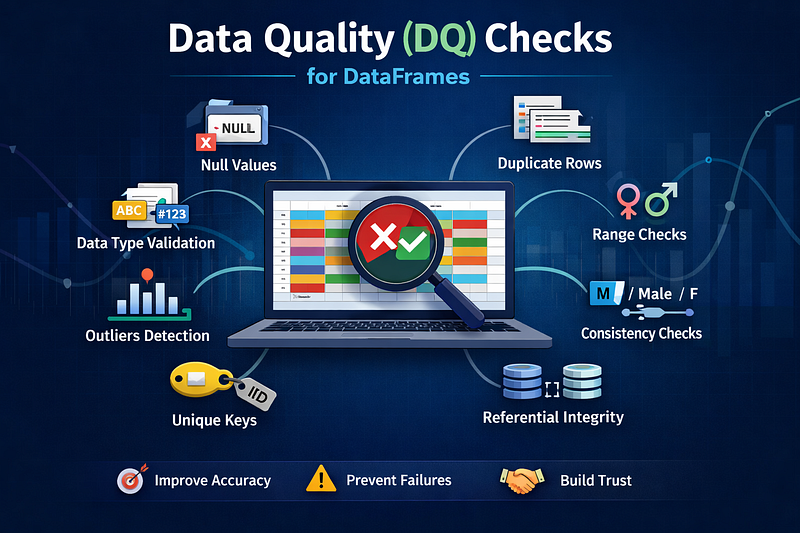
diagram of dq check for dataframe and data quality check with pandas .The type of dq validation in spark data quality framework , dataframe validation in python
type of data quality checks with example

In data engineering and data science projects, DataFrames (Pandas or Spark) are widely used. Performing DQ checks on DataFrames helps:

  • Detect missing or invalid values
  • Ensure correct data types
  • Identify duplicates
  • Improve ML model accuracy
  • Prevent pipeline failures

Why DQ Check is Important?

Poor data quality leads to:

  • Wrong business insights
  • Poor ML model performance
  • Data pipeline failures
  • Incorrect reporting

A proper DQ check ensures clean, trustworthy, and usable data for analytics and AI models.

Common Data Quality Checks for DataFrame

1.Null / Missing Value Check

Pandas Example

df.isnull().sum()

Spark Example

from pyspark.sql.functions import col
df.select([col(c).isNull().sum().alias(c) for c in df.columns]).show()

Purpose: Identify missing values that can affect model accuracy.

2. Duplicate Records Check

Pandas

df.duplicated().sum()

Spark

df.groupBy(df.columns).count().filter("count > 1").show()


Duplicate data leads to biased results and wrong aggregations.

3.Data Type Validation

Pandas

df.dtypes

Spark

df.printSchema()

Ensure correct types:

  • Age → Integer
  • Salary → Float
  • Date → Timestamp

4.Range Validation (Business Rules)

Example:

  • Age should be between 18–60
  • Salary must be greater than 0
df[(df['Age'] < 18) | (df['Age'] > 60)]

Helps detect invalid or corrupted values.

5. Unique Value Check

df['EmployeeID'].nunique()

 Ensures primary keys are unique.

6.Outlier Detection

Q1 = df['Salary'].quantile(0.25)
Q3 = df['Salary'].quantile(0.75)
IQR = Q3 - Q1
df[(df['Salary'] < Q1–1.5 * IQR) | (df['Salary'] > Q3 + 1.5 * IQR)]

Detects abnormal salary or numeric values.

7.Consistency Check

df['Gender'].value_counts()

Valid: Male, Female
Invalid: M, male, FEMALE, null

Use mapping or standardization to fix inconsistencies.

8.Referential Integrity Check

Used when multiple tables exist.

df_orders[~df_orders['cust_id'].isin(df_customers['cust_id'])]

Ensures foreign key consistency.

DQ Check Using PySpark (Production Ready)

from pyspark.sql.functions import col
# Null check
df.select([col(c).isNull().sum().alias(c) for c in df.columns]).show()
# Duplicate check
df.groupBy(df.columns).count().filter("count > 1").show()
# Range validation
df.filter((col("Age") < 18) | (col("Age") > 60)).show()

Benefits of Data Quality Checks

  1. Improves ML accuracy
  2. Prevents ETL failures
  3. Enhances business trust
  4. Detects data drift
  5. Ensures reliable reporting

 Best Practices for DQ Checks

  1.  Run DQ checks before model training
  2. Automate validations in ETL pipelines
  3. Maintain DQ logs
  4. Use tools like Great Expectations
  5. Validate both source and target data

Conclusion

Data Quality Checks (DQ Checks) are a critical part of modern data engineering and analytics pipelines. Clean data ensures accurate predictions, better business decisions, and stable ML systems.

Bad Data = Bad Decisions
Clean Data = Reliable Insights

About the Author

I am a Data Science Engineer specializing in Machine Learning, Generative AI, Cloud Computing, Hadoop, Scala, Java, and Python With expertise in cutting-edge technologies, I share valuable insights, blogging tips, and tech tutorials on DeveloperIndian.com, helping developers and data enthusiasts stay ahead in the industry.

Read Similar article 

Example on artificial intelligence

More from shubham mishra and Data Science Collective

Comments

Popular posts from this blog

How to Check if a Header Is Available in a Linux File – A Complete Guide

   How to Check if a Header Is Available in a Linux File – A Complete Guide When working in Linux environments, developers and system administrators often need to verify whether a specific header , field name, or column exists inside a file. This is especially common when dealing with CSV files , log files , configuration files , or any structured data. This guide explains multiple methods to check whether a header is present using simple Linux command-line tools. Why Check for a Header in Linux? Checking for a header is useful when you want to: Validate data files Ensure correct file formats Prevent script failures Perform conditional processing Linux provides multiple commands to check headers efficiently. 1. Using grep (Simple & Fast) grep -q "HeaderName" filename && echo "Header exists" || echo "Header not found" 2. Check Only the First Line head -n 1 filename | grep -q "HeaderName" 3. Using awk for Ex...

Building Multi-Agent Systems: Practical Tutorial for 2026

Building Multi-Agent Systems: Practical Tutorial for 2026 Introduction Multi-Agent Systems (MAS) are becoming one of the most powerful architectures in modern AI. In 2026, they are widely used in automation, trading bots, robotics, distributed AI, smart cities, and enterprise AI systems. Instead of relying on one large AI model, multi-agent systems use multiple intelligent agents that collaborate, compete, or coordinate to solve complex problems. This tutorial explains how to build multi-agent systems from scratch in a practical and beginner-friendly way. What is a Multi-Agent System? A Multi-Agent System (MAS) consists of multiple autonomous AI agents that: Perceive the environment Make decisions independently Communicate with other agents Work toward shared or individual goals Each agent has its own role, memory, and reasoning capability. Experts from IBM, Google Cloud, Gartner, Deloitte, and others are calling 2026 the "year of multi-agent systems" and "multi-agent o...

How to Improve Node.js Performance (100% Working Techniques)

How to Improve Node.js Performance (100% Working Techniques) Optimize Express.js for Speed, Security & SEO Node.js is known for its high performance, but improper configuration can significantly slow down your application. In this article, you’ll learn proven and production-ready techniques to optimize Node.js performance, improve server response time, and boost SEO rankings. Why Node.js Performance Matters for SEO Google ranking heavily depends on: Server Response Time (TTFB) Page Speed Security Headers Reduced Server Load A slow Node.js backend directly affects: SEO ranking User experience Crawl budget 1. Disable x-powered-by Header Default Behavior Express exposes the following header: X-Powered-By: Express This reveals your backend technology and slightly increases response size. Best Practice app.disable('x-powered-by'); Benefits Improves security Reduces header size Prevents fingerprinting Recommended by OWASP 2. Use Weak ETag for Better Performance Problem with Def...